
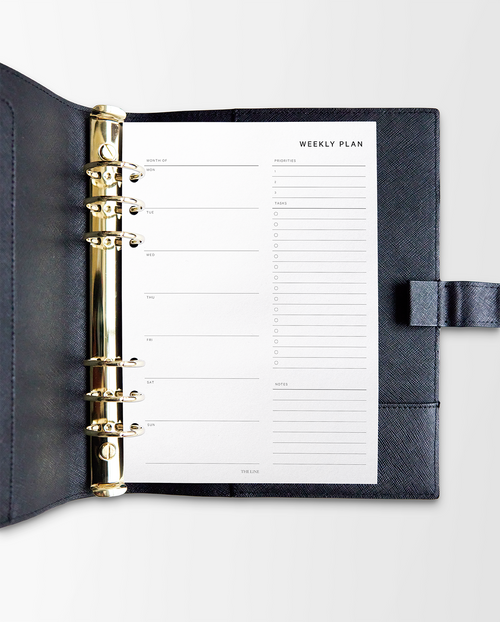


How to Use a Weekly Planner Effectively: A Simple Weekly Planning Routine
There is something about seeing an entire week on paper that makes life feel a little more manageable.
Instead of thinking about everything you need to do at once, a weekly planner gives your plans somewhere to go.
Meetings have a place. Priorities become visible. Tasks can be spread across the week. And the things you want to make time for can become part of your schedule too.
If you are wondering how to use a weekly planner effectively, the answer is less about creating the perfect planner spread and more about creating a planning routine you can return to every week.
Here is a simple way to begin.
What Is a Weekly Planner?
A weekly planner is a planning layout that allows you to see several days, typically your entire week, together.
Unlike a monthly planner, which is ideal for seeing the bigger picture, a weekly planner gives you enough detail to plan individual tasks and commitments.
Unlike a daily planner, it lets you see how those individual days relate to one another.
That makes weekly planning a useful middle ground for many people.
You can see what needs to happen without losing sight of how much is already on your schedule.
What Should You Put in a Weekly Planner?
Your weekly planner can include anything you need to see or accomplish during the week.
Start with:
-
Appointments
-
Meetings
-
Deadlines
-
Weekly priorities
-
To-do lists
-
Workouts
-
Errands
-
Meal plans
-
Social plans
-
Personal time
You can always add more later.
The goal is not to fill every available space. It is to give yourself enough information to understand the week ahead.
Step 1: Start With Your Monthly Calendar
Before planning the week, look at your monthly view.
Your monthly planner should contain the important dates and commitments you already know about.
Transfer anything happening this week into your weekly planner.
That might include appointments, birthdays, deadlines, travel, events, meetings, or other commitments.
These are your anchors.
Everything else will be planned around them.
Step 2: Review the Previous Week
Before immediately looking forward, take a moment to look back.
What did you finish?
What did not get done?
What still matters?
Not every unfinished task needs to move forward.
Sometimes a task has been sitting on your list because it is no longer important.
Cross it out.
Delegate it.
Move it.
Or decide when you are actually going to do it.
A weekly reset is as much about clearing space as adding things to your schedule.
Step 3: Choose Your Top Three Priorities
Now ask yourself:
What are the three most important things I want to accomplish this week?
These are different from your entire to-do list.
They are the things you want to protect time for even when the week gets busy.
Write them somewhere visible in your weekly planner.
When everything feels important, your priorities give you somewhere to begin.
Step 4: Add Your Non-Negotiables
Next, write down anything that needs to happen at a particular time.
For example:
Monday
9:00 AM team meeting
Tuesday
6:00 PM workout class
Thursday
2:00 PM appointment
Saturday
7:00 PM dinner
Adding these commitments first helps you understand what your week actually looks like before you start assigning tasks.
Step 5: Add Your Tasks
Now add the things you need to accomplish.
The key is to avoid putting your entire to-do list on Monday.
Spread tasks across the week based on your schedule, energy, and deadlines.
If Wednesday is filled with meetings, it probably is not the best day to schedule three hours of focused project work.
If Friday is quieter, that may be the better place for it.
Your weekly planner should help you create a realistic week, not an idealized one.
Step 6: Make Space for Your Personal Life
Your planner does not have to be a record of work.
Schedule the things that make your life feel like yours.
A workout.
Dinner with someone you love.
Reading.
A morning coffee.
A walk.
A slow Sunday.
Planning these things may feel unnecessary, but if something matters to you, it deserves space alongside everything else asking for your attention.
Step 7: Leave Room for the Unexpected
One of the easiest ways to make a weekly planner stop working is to plan every available minute.
Something will inevitably change.
A meeting gets added.
An errand takes longer than expected.
You wake up tired.
Your priorities shift.
Leave some white space in your week so your schedule can absorb real life.
Think of your planner as a guide rather than a contract.
Step 8: Check Your Planner Every Morning
Your weekly planning session creates the plan.
Your daily check-in keeps it useful.
Each morning, open your planner and look at:
-
Today's schedule
-
Today's priorities
-
Any deadlines
-
What is coming tomorrow
This can take less than five minutes.
You are simply reminding yourself what you decided was important before the day begins making decisions for you.
Step 9: Reset at the End of the Day
At the end of your day, take another few minutes to check in.
Mark off what you completed.
Move anything that genuinely needs to be rescheduled.
Add anything new.
Look briefly at tomorrow.
Then close your planner.
You do not need an elaborate evening planning routine for your planner to be effective.
Consistency matters more than complexity.
Step 10: Create a Sunday Reset Ritual
Choose a regular time each week to plan.
For many people, Sunday works naturally.
Make a coffee or tea. Clear your desk. Put your phone away. Open your planner.
Then:
-
Review the week that just ended.
-
Check your monthly calendar.
-
Add appointments and commitments.
-
Choose your weekly priorities.
-
Add tasks.
-
Schedule workouts and personal plans.
-
Look at the entire week one final time.
Ask yourself:
Does this week actually feel doable?
If the answer is no, adjust it now.
That is one of the most valuable parts of planning.
Weekly Planner vs. Daily Planner: Which Is Better?
Neither is inherently better.
The right layout depends on how you think and what your days look like.
A weekly planner may work best if you:
-
Like seeing your entire week at once
-
Have a moderate number of daily tasks
-
Want a balance between structure and flexibility
-
Prefer big-picture planning
A daily planner may work better if you:
-
Have a packed schedule
-
Need significant writing space
-
Plan by the hour
-
Manage many appointments or tasks
-
Like detailed time blocking
And you do not necessarily have to choose.
With a customizable ring planner, you can use weekly pages for most of the year and add daily pages during particularly busy seasons.
Your planner can change with you.
How to Actually Stick With Weekly Planning
If you have started and abandoned planners before, simplify your approach.
You do not need perfect handwriting.
You do not need a complicated color-coding system.
You do not need to fill every page.
And missing a week does not mean you failed at planning.
Open to the current week and begin again.
A planner is meant to be used, changed, written in, crossed out, rearranged, and lived with.
The goal is not a perfect planner.
The goal is a planning system that helps you spend your time with greater intention.
Make Planning Part of Your Week
A weekly planner gives you something increasingly rare: a moment to look at your life as a whole.
What needs your attention?
What can wait?
What are you working toward?
And what do you want to make room for along the way?
Take a few minutes each week to answer those questions.
Then put them on paper.
Explore The Line's Weekly Planner Inserts and create a planning system designed for the way you live.